Put an install button for your test build in a README or Notion page
· 6 min read
Every team has a page where people look for the current test build: a GitHub README, a Notion page, a Confluence space, a pinned Jira ticket. Usually it holds a bare link someone pasted months ago, and nobody is sure whether it still works. A clear "Install test build" button in that spot saves a lot of "which link do I use?" messages.
This post shows how to add such a button, the difference between a button for one build and a button for a channel that always shows the current version, and how it behaves in the tools teams use most. Facts about AppForShare, the tool we make, are as of November 9, 2026.
Two kinds of button
A download button is a small image with a link around it. The image is an SVG badge, 200 by 60 pixels, in dark or light, with a small "AppForShare" line and a large "Install test build" line. What changes is where the link goes and what the image says.
| Build button | Channel button | |
|---|---|---|
| Opens | The install page of one build | The channel link, which opens the newest build in it |
| Image | Fixed: "Install test build" | Live: "Install test build" over the current version, such as v2.4.1 (119) |
| Image refresh | Cached for a day (it never changes) | Cached for 5 minutes |
| When the link ends | Leads to the expired page | Keeps working while the plan is active |
| Plan | Free and up | Pro and Team |
On the Free plan, build links expire after 7 days. The badge does not change that: once the link ends, the button leads to the expired page. For a README that should keep working, use a channel button on Pro or Team, where the link stays live while you are subscribed and always points at the newest build you promote.
Where to find the snippet
For one build, open the build page in the dashboard and use the "Add a download button" card. For a channel, open the project's Testing page and use "Download button" on the channel row. Both give you a Markdown snippet and an HTML snippet, with alt text that reads "Install the test build of" followed by your app name. If your account uses a custom domain, the link uses it.
A build button in Markdown looks like this:
[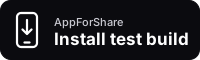](https://appforshare.io/i/AbC123?ref=badge)The light version adds ?theme=light to the image address. A channel button points the image at the channel's badge, so the version on it follows the channel:
[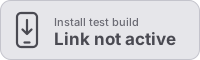](https://appforshare.io/c/example-beta?ref=badge)The HTML version is the same idea, for pages that take HTML but not Markdown:
<a href="https://appforshare.io/c/example-beta?ref=badge">
  <img src="https://appforshare.io/badge/c/example-beta.svg" width="200" height="60"
       alt="Install the test build of Example">
</a>
Copy the snippet from the dashboard rather than typing it, so the build code or channel address is right.
What the channel badge shows
The live badge reads the newest build put into the channel, the newer of iOS and Android, and shows its version and build number. A few states are worth knowing:
- Private project. On a testers only project (Team), the badge says "Invited testers" instead of the version. Nothing about the build is shown to people who are not on the list.
- No build yet. A new channel shows "No build yet" until you promote one.
- Link not active. If the channel was deleted or the plan lapsed, the badge turns grey and says "Link not active", so a stale README is obvious.
No badge carries tester data. The badge says "test build" and never names the App Store or Google Play: it is not a store badge and should not be used as one. For an app that is live in a store, use the store's own badge and link.
The install page still decides who can install
The button is only a link. Everything you set on the build still applies when someone clicks it: the password, per tester access codes, the stop date, the install cap and, on Free, the 7 day expiry. Putting a button in a public README does not make a private build public. If a link is passworded, readers see the password prompt.
For iPhone builds, the device still has to be in the provisioning profile of an Ad Hoc or Development build. A button does not get around that. If testers on iPhone get stuck, our posts on iOS code signing errors and registering a test device explain the usual causes.
Using it in GitHub, Notion, Confluence and Jira
GitHub README
Paste the Markdown snippet. GitHub shows README images through its own image proxy, so a new version on a channel badge may take a little longer than 5 minutes to show. The link itself always goes to the newest build.
Notion
Notion does not render raw HTML. Add the badge as an image from its address, then put the install link right under it as a normal link, or paste the channel link on its own as a link preview. Readers can tap either.
Confluence
Insert the badge as an image from a web address and add the install link to the image, or use the HTML snippet where your Confluence setup allows HTML. A plain link under the image works everywhere.
Jira ticket
For a release or QA ticket, a channel link in the description is often enough. Add the badge image if you want the version visible at a glance; with a channel badge the ticket shows the current build without anyone editing it.
Counting clicks from the button
Every snippet adds ?ref=badge to the link. The install page counts those visits, and on Pro and Team the analytics show how many page views came from a download button, in a line that reads "N of the M page views came from a download button". A channel passes the marker on to the build page it opens. Free accounts do not see that count, because analytics are part of Pro and Team.
Getting the snippet from the CLI or an assistant
If you generate docs in CI, the CLI prints the snippet for a build or a channel. It needs a Pro or Team API token.
npx appforshare badge beta --markdown
npx appforshare badge AbC123 --html --light
The MCP server has a read only get_install_badge tool, so an AI assistant can paste the right snippet into a README for you. See the MCP docs for setup.
Common questions
Does the button work on the Free plan?
Yes, the build button works on Free. The build link still expires after 7 days, and then the button leads to the expired page. The live channel button needs Pro or Team.
Will the version on the badge update by itself?
On a channel button, yes. The image is cached for 5 minutes, so it follows the newest build you put into the channel shortly after you promote it. A build button never changes.
Is this an App Store or Google Play badge?
No. It says "Install test build" and opens a test build install page. Use the official store badges for store listings.
Can people outside my team install from a public README?
Only if the build lets them. Passwords, access codes, stop dates, install caps and private projects all still apply behind the button.
For more on keeping one link for every build, see letting testers follow a build link and the download button feature page. You can create a free account and add a build button to your README today.